TUI
This option is more user friendly and it allows to navigate on the results visually.
The results are the same as the other modes, but being interactive allows the user to easily navigate on those results.
When we perform the search adding the flag --interactive, the results are presented using a different interface where the user can easily navigate and see those results.
The interactive screen is something similar to this:
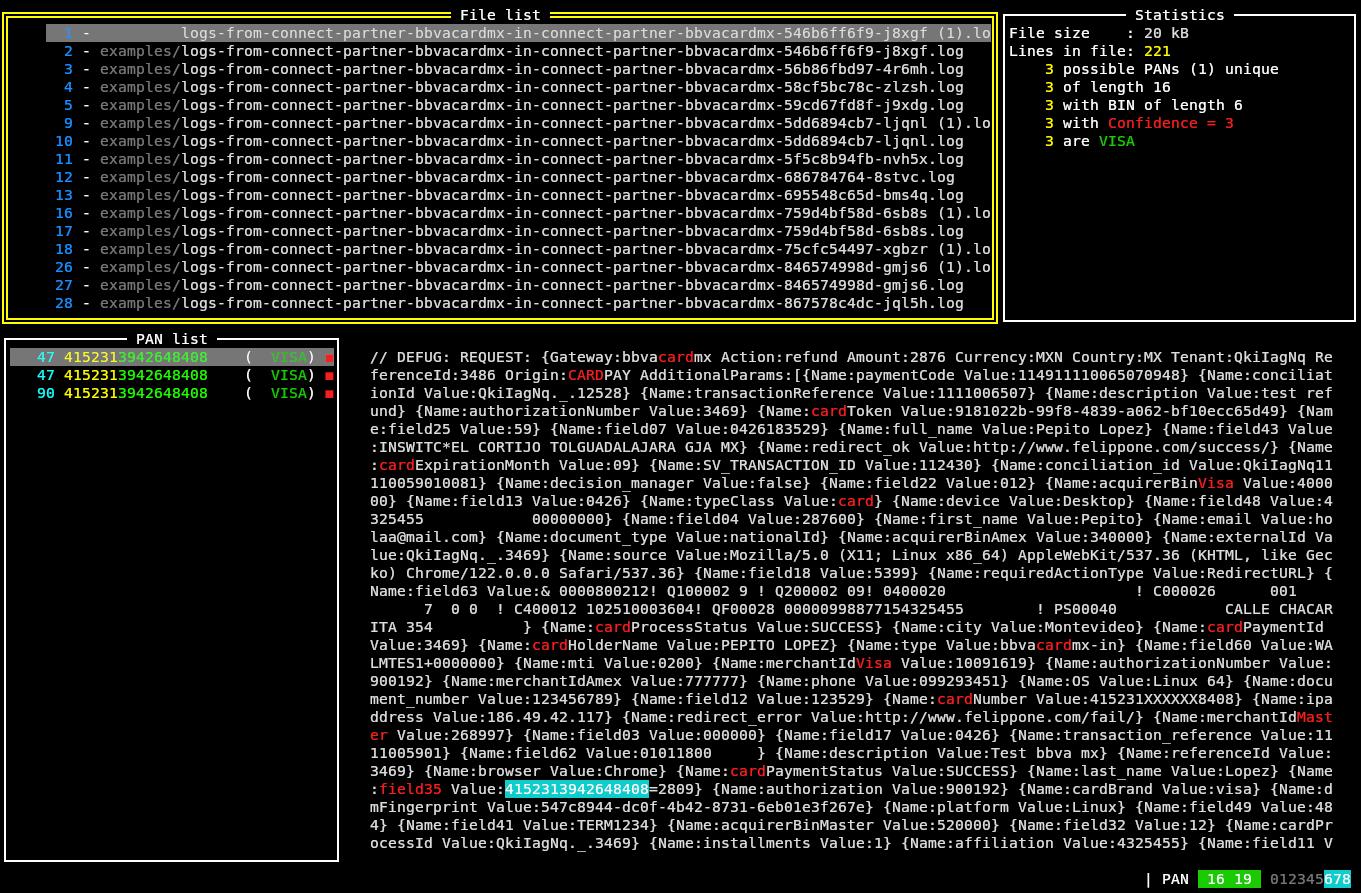
Where we can see the screen divided into sections or panels.
On the top left, we have the section called "File list" were we see the list of files containing possible card numbers. If we move through this list, we will see the information displayed in the other panels to change accordingly.
In the top right panel, we have information about the selected file on the left. We see information about the file like size and number of lines, and also information about the findings.
In the lower left panel we see the list of possible card numbers found, showing also the line number inside the file, the value of the possible PAN, the brand and the confidence level represented by different colours.
In the section below and to the right, we see the complete line that contains the possible PAN with the key words (if present) in red and the possible PAN highlighed in white over cyan.
Finally, in the lower bar to the right, we see an indicator of the PAN lengths considered (in this case 16 and 19) and the considered lengths for the BINs.
To navigate between the panes we can use the TAB key, and navigate inside each panel by using the arrow keys.
To exit this mode we just press the Esc key and confirm.