CONVERT
Converts files to a different format.
Sintaxis
$ cardak help convert
usage: cardak convert [<flags>] <format> <files>...

Convert files between formats.

Files have three characteristics:

  Encoding         : Which characters each byte value represents (ASCII or EBCDIC are supported)
  Record definition: Records can be of fixed length, delimited, or determined by a length
  File packing     : Then can have no packing (NORMAL) or can be packed in blocks (typically 1014)

This tool allow to convert files changing those formats

Flags:
      --help                 Show context-sensitive help (also try --help-long and --help-man).
  -v, --verbose              Add more information displayed on some commands.
      --mono                 Supress color on output.
      --ignore               Try to ignore some errors and continue processing the file
  -W, --width                Ignore small terminal width check and force execution
  -z, --silent               Suppress all output (banner, headers, summary) except the results. Specially useful for DESCRIBE command piped to a search
                             utility like fzf
  -T, --file-type=FILE-TYPE  Filter by file type when supplying several files. File types are represented by a single letter as: I-IPM files, M-MPE files

Args:
  <format>  New file format The format consists of three consecutive characters that indicate the Encoding, the record format, and the file format. Valid
            values are:

              Encoding      : [E] - EBCDIC, [A] - ASCII
              Record format : [R] - RDW, [F] - Fixed 1400, [1] - Fixed 1400, [6] - Fixed 600, [D] - Delimited
              File format   : [B] - Block 1014, [N] - Normal
  <files>   List of files. This can be a single file or you can use wildcards
Description
This command converts the format of a file (typically an IPM file) into a different format, keeping the original data. This is useful when we receive an IPM file in a different format or encoding than the expected by the processing system. Many times it is not possible or we don't have time to request a new file in the required format. These formats are usually coordinated with the brand and they should not change, but it is common to have these incompatibilities problems, especially during development.
Files handled by MasterCard (and in particular IPM files) have three main characterstics which are, the encoding, the record format and the file format.
Encoding
Inside these files there are different data types. Some are just binary values (like the record length or fields that hold binary data like cryptographic information not expressed in HEX or Base64), and other ones that are basically just text.
These fields that contain text can be encoded using either ASCII or EBCDIC.
EBCDIC was used mostly from the beginning when those files were generated in Mainframes, and that was the natural encoding for those systems, being the IBM valiety the most common.
For example, to represent the value "CARDAK2025", we will have:
| Encoding | Value (HEX) |
|---|---|
| ASCII | 43 41 52 44 41 4B 32 30 32 35 |
| EBCDIC | C3 C1 D4 C4 C1 D2 F2 F0 F2 F5 |
Record format
When records are stored in a file, they can be represented in different ways. The most common are delimited, fixed or variable.
Delimited: Each record ends with a delimiter. This is the case of plain text files where each record is contained in a single line, and the end of the line is indicated by a special character (or sequence). In systems based on DOS and Windows, the control characters CR/LF (0x0Aand0x0D) are used, and in systems based on Unix (including Linux and other variants like BSD) it is represented by just the character LF (0x0D).Fixed: In this case each record contains a fixed number of characters so we don't need to have any delimiter. It is necessary to know the length of each record so we can process it correctly. Typica values used in interchange files, mostrly used by Amex, are 600 or 1400 charactersVariable: This formats includes for each record, a small header indicating the length of the record followed by the record data. To read it we first need to read this header (usually one, two or four bytes), calculate the length of the record, and then read that number of bytes. After that, the next record should come. This format is noted as RDW
MasterCard files IPM and MPE contain varialbe length records. Files used by other brands can be either fixed length or delimited.
File format
Additionaly, MasterCard tends to format these files in blocks of 1014, that is, the contents of the file is written in chunks of 1012 bytes plus two fillers to complete a full 1014 block. The last block is filled as necessary with as many fill characters needed to complete the 1014 block. So all files with this format have a size with is a multiple of 1014. The characters used to fill the blocks are, as the standard, the value 0x40
Utility
Usually, systems that create or process these interchange files are configured to handle just one of these combinations, so it is important to agree with the brand which format to use. In early stages of development, test or certification, it is not uncommon to have these files in an incorrect format, forcing the systems to be configured differently, which is not always easy.
This tool allows to convert the format of a file to a different one while keeping the data contained in the file.
The new format is indicated by using three consecutive letters without spaces, where the first one corresponds to the encoding, the second one the record type, and the last one the file format.
For the encoding, we use the letter A to indicate ASCII, or the letter E to indicate EBCDIC (The two most common options for interchange files)
For the record type we use R for variable record length (or RDW), F or 1 for fixed length records of 1400 characters, 6 for fixed length records of 600 characters, and D for delimited records (the record delimiter depends on the operating system where the tool is used, which can be either Windows or Linux)
Lastly, for the third option, we use the letter B if we want the file to use blocks of 1014, or N if we want the file to be a "normal" file (regular file without blocks)
For the command, the first parameter is the format (by using the three letters) and then one or more file names to be converted.
The converted files are named from the original file name plus a dot, the three letters for the format, and the extension ".cvt"
This command can work with almost any file type, but IPM files are treated differently, because they can contain binary data and we should not try to convert their encoding or we would be changing the value. So the tool, when dealing with IPM files, parses each record, changes the encoding of the fields that need to be changes, and writes the new file using the new encoding, record and file format.
This command is optimized and processes records as they are read, so it can work with big files without requiring excessive memory usage.
A handy flag we can use is -T to specify the type of files to process. So if we supply a list of files of different types by using a wildcard, only the files of the given type will be converted, and the rest will be ignored. Currently we can specify the type by using the I for IPM files, and the letter M for MPE files
Example
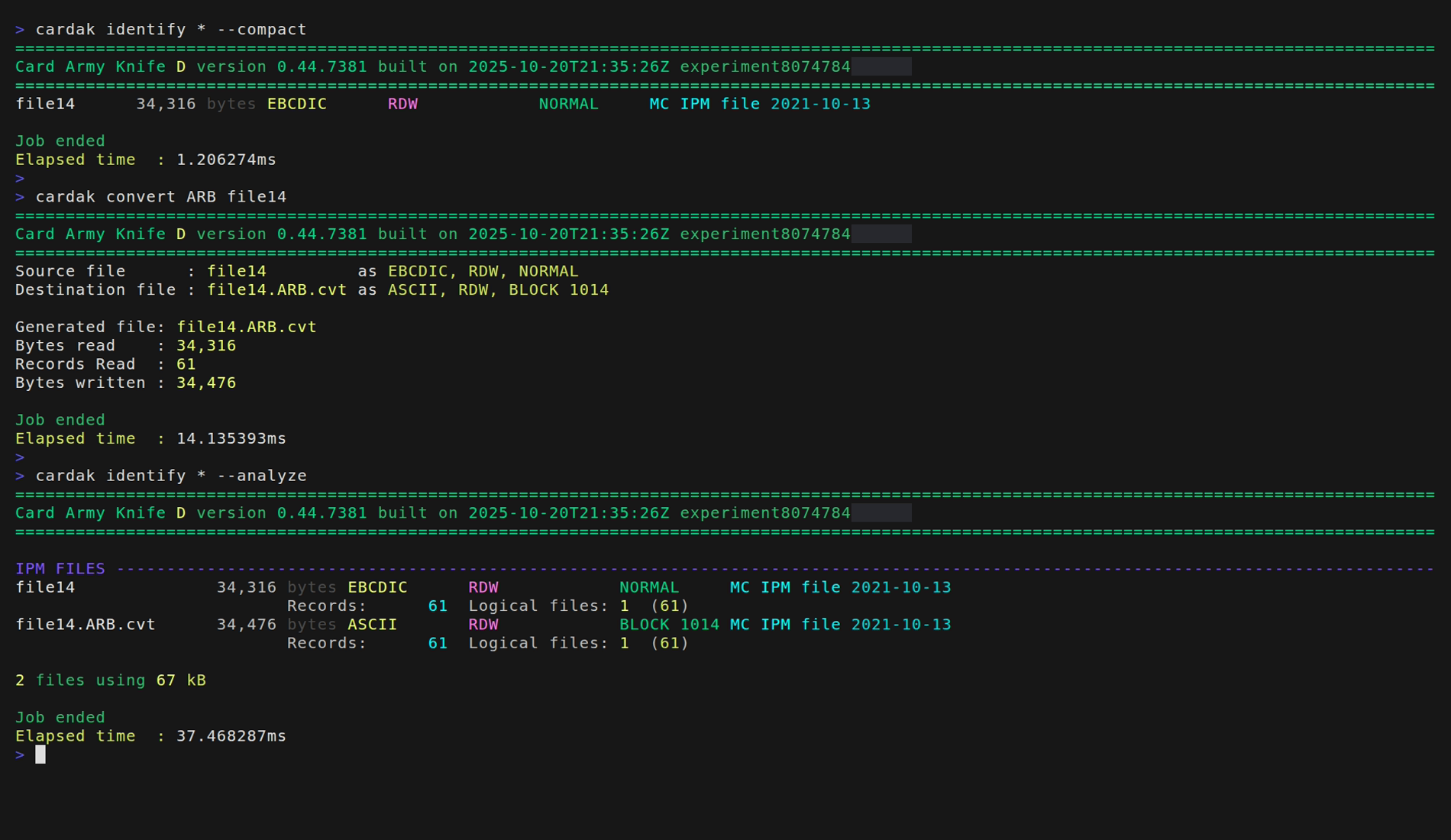
As we can see, the original file is not changed, and a new one is generated with the same contents but with the indicated format.
It is important to nothe that we don't need to specify the input file format as it is automatically detected.