DISTRIBUTE
This command distributes records into multiple output files based on rules.
Syntax
$ cardak help distribute
usage: cardak distribute [<flags>] <files>...

Separate one IPM file into serveral ones by a given criteria.

By defining a criteria configuration file, the contents of an IPM file can be distributed across multiple files where each file contains records for each
criteria.

Sub_commands:

  Instead of an IPM file, you can write "list" to show all defined criteria, or you can
  specify the criteria name to display how it is configured.
  Example:
      cardak distribute list      -> to show all existing definitions
        cardak distribute <defname> -> Show the definition for <defname>

Flags:
      --help                 Show context-sensitive help (also try --help-long and --help-man).
  -v, --verbose              Add more information displayed on some commands.
      --mono                 Supress color on output.
      --ignore               Try to ignore some errors and continue processing the file
  -W, --width                Ignore small terminal width check and force execution
  -z, --silent               Suppress all output (banner, headers, summary) except the results. Specially useful for DESCRIBE command piped to a search
                             utility like fzf
  -T, --file-type=FILE-TYPE  Filter by file type when supplying several files. File types are represented by a single letter as: I-IPM files, M-MPE files
  -c, --config=CONFIG        Configuration file to use, otherwise it uses the default one
      --delete               Remove the given configuration
      --dry                  Dry-run, simulate the process but do not create any files
      --keep                 Do now delete empty generated files
  -L, --load                 Load the given configuration for later use. It the configuration already exists, it will be replaced
  -U, --unload               Create a local version of the given configuration

Args:
  <files>  List of files. This can be a single file or you can use wildcards
Description
This command allows to clasify and distribute records from an IPM file into different files accoring to specific rules. This can be handy if, for example, we receive a file containing transactions belonging to different processors mixed in the same file. We need each processor to receive files containing only their transaction (This is a real case scenario currently being used by one client). Or we may want to distribute the records in a file putting all First presentments into one file, and the Fee collections into another file.
To execute this command, we need to define the criteria to apply for clasification of the records in a separate configuration file.
We can list the available configuration files using the following command: "cardak distribute list"
There are two possible locations for these files, either in the local folder, or in the "HOME" folder for the user running the application. To copy the file into the HOME folder, we can use the --load flag as we will see later.
The configuration files are in JSON format and their template is the following:
{
    "<ID>": {
      "FileName": "File1",
      “FilePattern”: “$B₁.$E”,
      “Directory”: “/usr/dir/”,
      "Description": ""
      "ProcessorID": "123456789",
      "FileSequence": 1,
      "BinRanges": [
        {
          "BinMin": 0,
          "BinMax": 9999
        }
      ],
      "MtiList": {
        "1240": true
        "1442": true
        "1644": true
        "1740": true
      },
      "FieldValues": "DE49:858"
    }
}
Let's analyze in detail how this works:
In the first level of the JSON, we will insert entries, one for each file to generate. Each of these entries have a name (represented here by '<ID>' but we can choose any name as we will see later).
For each entry, we can define the name of the file ("FileName"), an optional description ("Description") a "ProcessorID" and a "FileSequence" that will be used to create the file heading. This is necessary because all records with a matching condition will be stored in a different file, and their header in field PDS0105 need different values. The SF01 (File Type) is a copy of the original file, as it is SF02 (File Reference Date)
The generated files have their names according to the following rules:
If the field FilePattern is not present, the files will have the same name as the original file (without the extension), followed by the underscore "_" plus the value under FileName, and finally the extension ".ipm"
If we indicate a FilePattern, which is a string containing an optional combination of tokens a characters and used as a pattern to create the corresponding file name.
The available tokens are:
  $B                 -> Base name of the input file (name without extension)
  $E                 -> extension (without the separator dot)
  $D[YYYYMMDD]       -> date/time using the following definitions
                        YYYY, YY, MM, DD, hh, mm, ss
  $F[start:end]      -> Substring of the base name (rune based). Negative values count from the last position and backwards
                        `start` is 0 based and `end` indicates the upper limit but excluded from the range
                        Both `start` and `end` can be ommited, assuming the first and last position accordingly
                        Examples:
                          "ABCDEFGH" using $F[2:4] -> "CD"
                          "ABCDEFGH" using $F[:4]  -> "ABCD"
                          "ABCDEFGH" using $F[4:]  -> "EFGH"
  $F[-N]             -> Last N characters of the base name
  $F[N]              -> First N characters of the base name
  $F[N$]             -> Last N characters of the base name (alias to $F[-N])
  $$                 -> Literal dollar sign

Examples:
  FilePattern: “$F[:7]_DATA_$D[YYYYMMDD]-$F[7:].$E”
  (First seven characters) + "_DATA_" + (Date as YYYYMMDD) + "-" + (characters from position 8 to the end) + "." + (extensión)

Where, assuming this values: File name = TT112T0abcdefghijkls.ipm, Current date=2025-09-27
it will create → TT112T0_DATA_20250927-abcdefghijkls.dat
If we supply a folder, the file will be generated in that location. In case the folder does not exist, the tool will try to create it, but can fail if the user has no permission for creating directories. The SF03 (Processor ID) and SF04 (File Sequence Number) are the indicated in those entries.
Now let's see the conditions to be met by a record to be included in that particular file. Those conditions are, BIN range, MTI, or a value on any field of the record. These conditions are optional, but at least one of them should be present.
The BIN range consists in a list of Min and Max pairs, and if the BIN in field DE002 is between any of those ranges, it is considered valid (remeber that ALL of the conditions have to be met to consider a match). No specific BIN length is assumed, and it is derived from the Max and Min values indicated in the condition.
We can also indicate which MTI values to consider when matching the record.
Last, we can apply the "FieldValues" rules where we put a list of fields and their values, using the same rules used in commands like GREP (a list of field:value separated by commas or semi-colons)
We can check the existing configurations by using the parameter "list" like this:
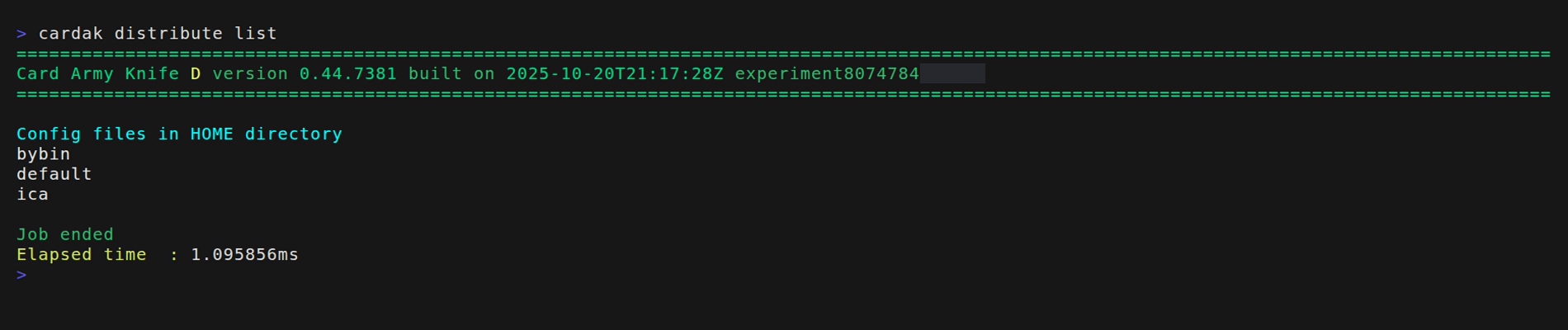
We can see that we have two loaded configurations. One called "default" that is to be used by default unless another is specified.
To see the contents of the definitions, we can add the --verbose flat or specify the name of the configuration to see
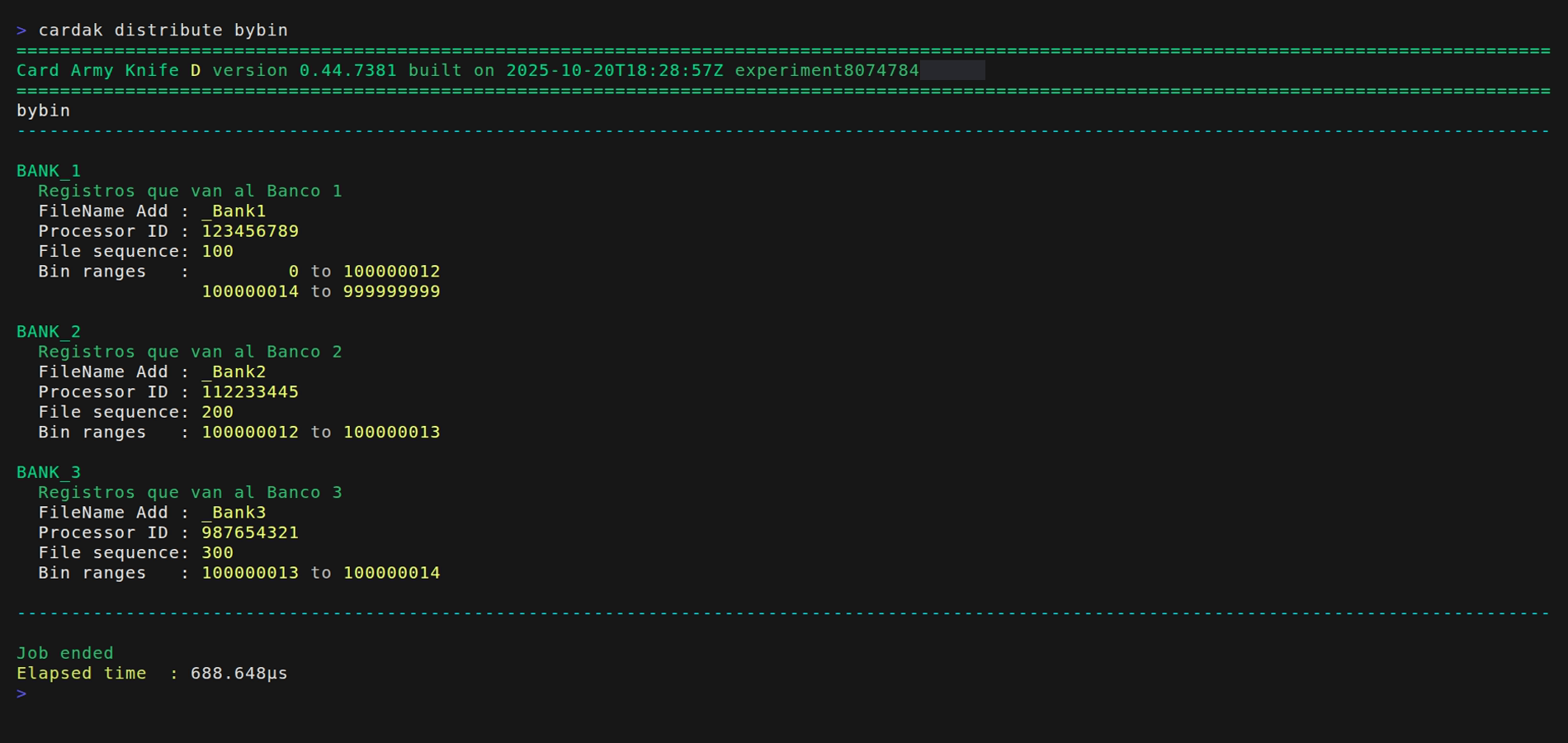
Let's see a simple and practival example. We want to separate the transaction from one file into two different files so that all transactions in USD are contained in one file, and the ones in UYU go to another file.
We will create a configuration file named “money_dist.json” and we put this contents inside:
{
  "1-PESOS-858": {
    "FileName": "pesos",
    "FilePattern": "$F[:7]_PESOS_$F[7:].$E",
    "Description": "Transactions in Pesos Uruguayos",
    "ProcessorID": "123456789",
    "FieldValues": "D49:858"
  },
  "2-DOLARES-840": {
    "FileName": "dolares",
    "FilePattern": "$F[:7]_DOLARES_$F[7:].$E",
    "Description": "Transactions in Dollars",
    "ProcessorID": "987654321",
    "FieldValues": "D49:840"
  }
}
Here I am telling that I want to generate two files, one with the name "pesos" and the other one named "dolares".
Each file will contain the correspongind ProcessorID, but as we are not specifying a FileSequece, the same as the original file will be used.
About the conditions, here we are not using neither the BIN ranges or the MTI, but we are specifying that for "pesos" field DE049 should containd the value 858 and for "dolares" this field should contain the value 840
Let's see the avialalbe configurations
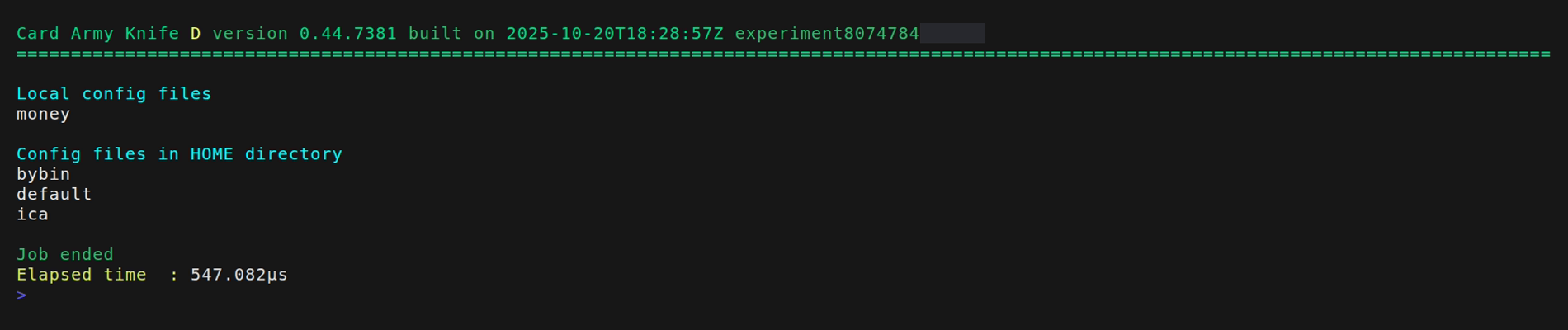
As it is not advisable or practical to have the configuration file in the local directory, let's put it into the HOME directory by using the --load flag.
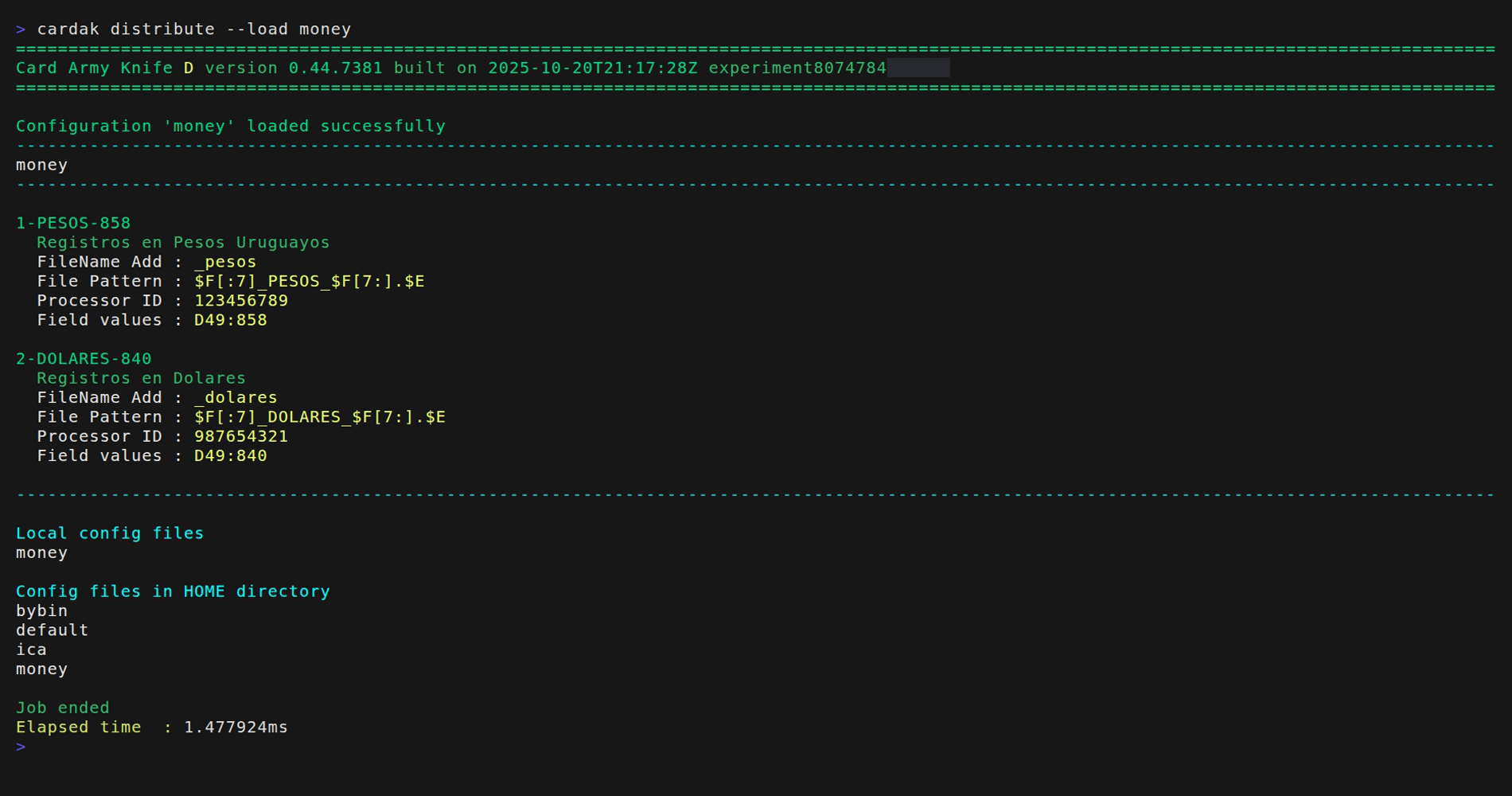
Now we can just delete the local file “money_dist.json”, but the configuration will be available through its copy in the HOME directory. If two configurations files with the same name are present in both the local and HOME directory, the local one is used, so we can easily overwrite an existing configuration.
To use this command, we need to give the name of the file containing the records and, optionally, the name of the configuration to apply.
If we don't supply any configuration file, the tool will try to use a configuration named "default". This is useful if we use the same configuration most of the time so we don't need to specify any configuration by just omiting it, which will use the "default" one if it exists.
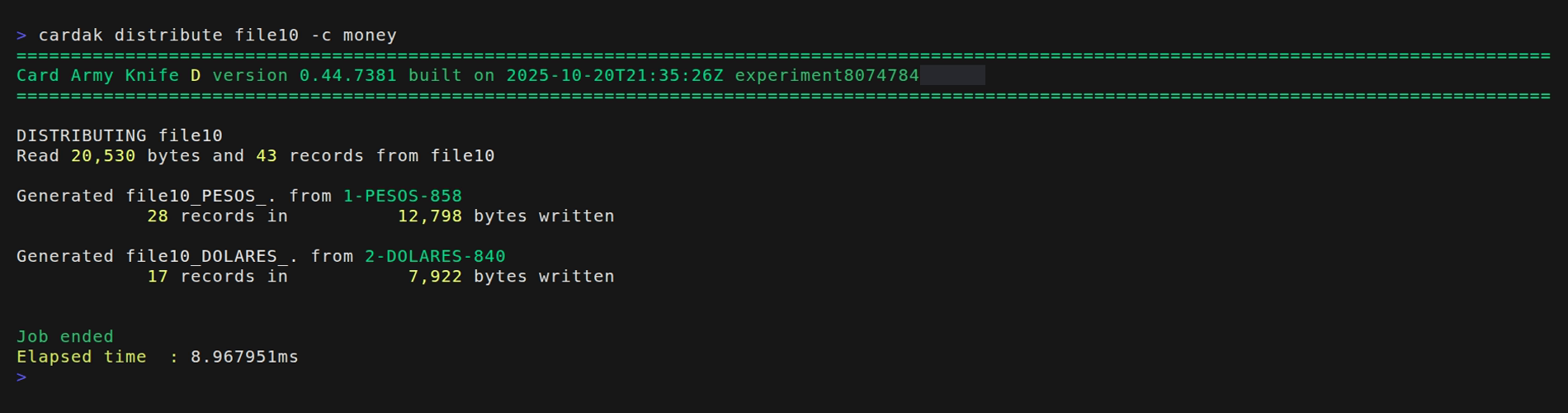
In this example we will use file file10. First we will perform a simulation by adding the --dry flag. (This step is optional but recommended, and here we will use it for demonstration purposes)
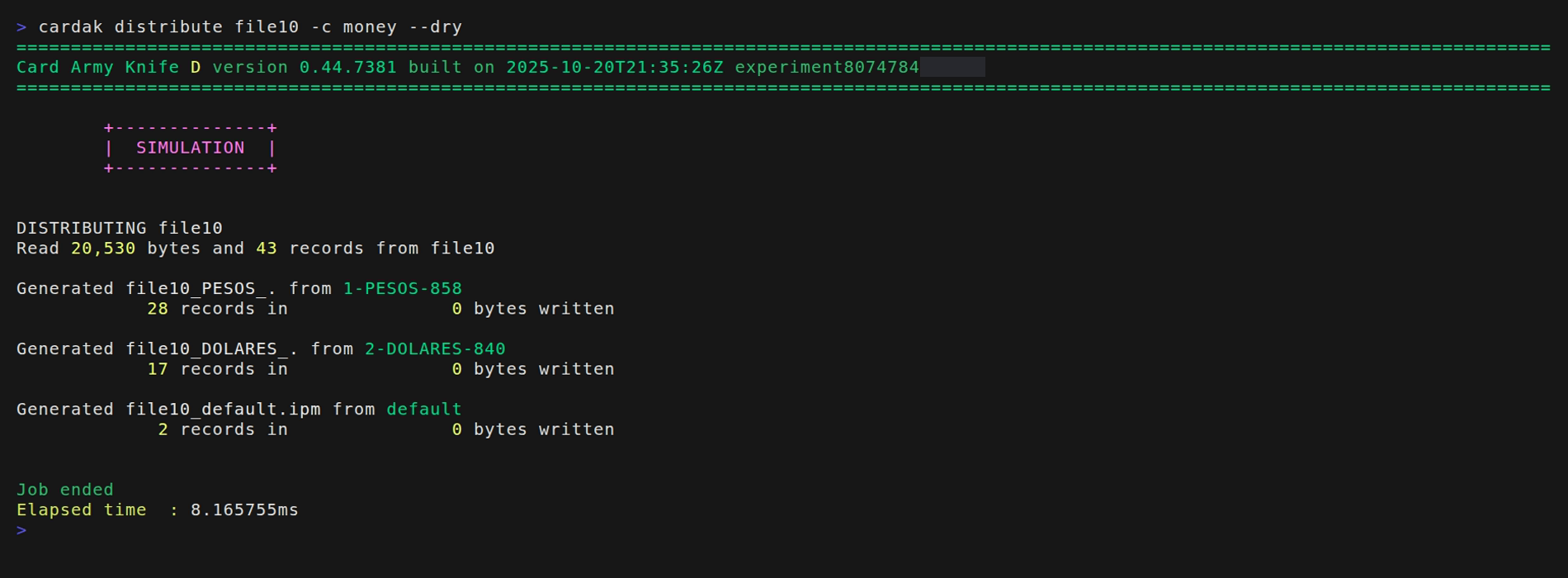
The --dry flag executes a simulation, so no actual files are written, but the information about what should have been generated is displayed, printing the file name and number of records for each file.
In this case, the process will take all 43 records from file10 and it will create a file with 28 records in UYU and another one with 17 records in USD.
We see a third file named "default" which is a file containing all records that did not mach any of the conditions (it can be empty)
In this particular case all records matched so the file "default" would contain just a header and trailer, so this file will not be created but it is shown here as part of the simulation. If we want to keep this empty file we have to add the --keep flag.
If we want to generate the actual files we just omit the --dry flag.