GREP
Performs flexible searches in one or more IPM files.
Syntax
$ cardak help grep
usage: cardak grep [<flags>] <criteria> <files>...

Find data in files.

It can search for values regardless of the file format, and it has the ability to understand IPM records to specify in what fields to perform the search

Flags:
      --help                 Show context-sensitive help (also try --help-long and --help-man).
  -v, --verbose              Add more information displayed on some commands.
      --mono                 Supress color on output.
      --ignore               Try to ignore some errors and continue processing the file
  -W, --width                Ignore small terminal width check and force execution
  -z, --silent               Suppress all output (banner, headers, summary) except the results. Specially useful for DESCRIBE command piped to a search utility like fzf
      --version              Display program version and exit
  -T, --file-type=FILE-TYPE  Filter by file type when supplying several files. File types are represented by a single letter as: I-IPM files, M-MPE files
  -R, --records=RECORDS      List of record numbers to be searched. Values are separated by comma (,) and ranges are indicated by the starting and ending record separated by a hyphen (-)
  -F, --fields=FIELDS        List of IPM fields to search in (can use a filter name)
  -I, --include=INCLUDE      List of IPM fields to list from a matching record, even if these fields don-t have a match (can use a filter name)
      --summary              Only display file names and the matching count for each one.
      --matches              Only display file names and the list of record numbers that match.
  -C, --code=CODE            Filter by Function Code description

Args:
  <criteria>  Search criteria. This is a list of criteria, elements separated by a comma (,) are ANDed together, while elements separated by a semi-colon are ORed together. Each element
              consists of an optional field descriptor followed by a colon (:) and the value to search. Field descriptors consist of an optional letter (D-DE fields, P-PDS fields) and the
              corresponding field number. If the field descriptor consist of only numbers, then a three digit number is taken as a DE field, and a four digit number is taken as a PDS field.
              An example could be: 'DE43:Supermarket' to search for records having field DE43 that contain the string "Supermarket"
  <files>     List of files. This can be a single file or you can use wildcards
Description
This is probably one of the most useful and versatile commands of this tool. It allows to perform complex, intelligent searches in one or more IPM files.
The idea for this command was taken from the grep command found in most Unix systems, and in particular this CardAK grep takes into account the internal format of the records which allows to perform more precise searches.
A use case can be when we need to find a transaction but we don't know the file that contains that transaction. Instead of opening the files one by one, we can perform a massive search with the values for the transaction and quickly find the files that contain that information. Then, we can apply other operations on those files and records.
Usage
The first parameter is the search criteria followed by file names where the data is to be serached.
This first parameter consists of a list of criteria where each one is either a value to search on every field of the record, or a field identifier and the value to search separated by a colon (":"). This way to identify a field is explained in the Flags and Filters section
This list of criteria can consist of one or more criteria. If they are separated by a comma (",") then they are considered related with the logic AND operator (all of them must match), and if they are separated by a a semi-colon (";"), then they are related using the logical OR operator.
We can limit the search only to some records using the -R flag, where we specify the records or range where the search will take place.
We can also limit the search to only some fields by using the -F flag. In this case the search will be limited only to the given fields.
The command shows the matching fields and values but we can also include other fields from the record in the result, even if those fields are not part of the search. This is achieved by using the --include (-I) flag and giving the list of fields that we need to be displayed for the matching records.
If we apply the --summary flag, only the name of the files containing at least a match will be shown, along with the number of matching records in the file.
With the --matches flag, we display the file name and the list of records that match.
We can also use another filter to limit the search with the --code (-C) flag, where we limit the search by putting part of the description for the desired Function Code (for example using “Second Presentment”, or “Partial”)
Example
We have some files and we want to find a given transaction. We know that the transaction was performed for an amount of $112.60 and that the merchant was a Supermarket (Supermercado). We can then perform the search like this:
Field containing the amount: DE004 Field containing the Card Acceptor Name: D043
So we first perform the global search:
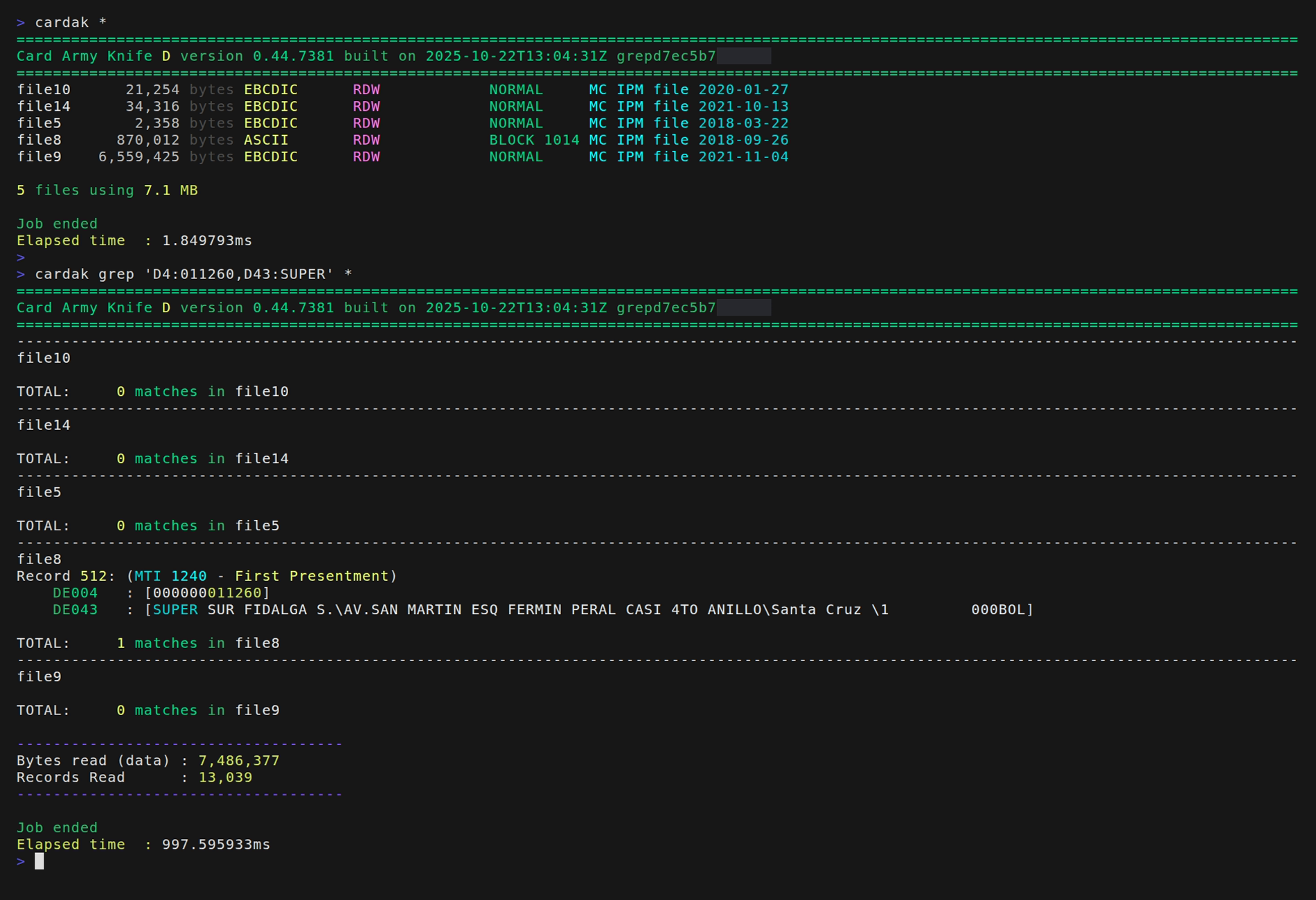
Perfect!, we have determined that the transaction is in file file8 and that it is located in record 512 inside that file.
If we also want to see the contents of the fields DE002 (Primary Account Number), DE012 (Transaction Date and Time) and field DE038 (Approval Code), we can modify the output result by adding the flag -I indicating those fields:
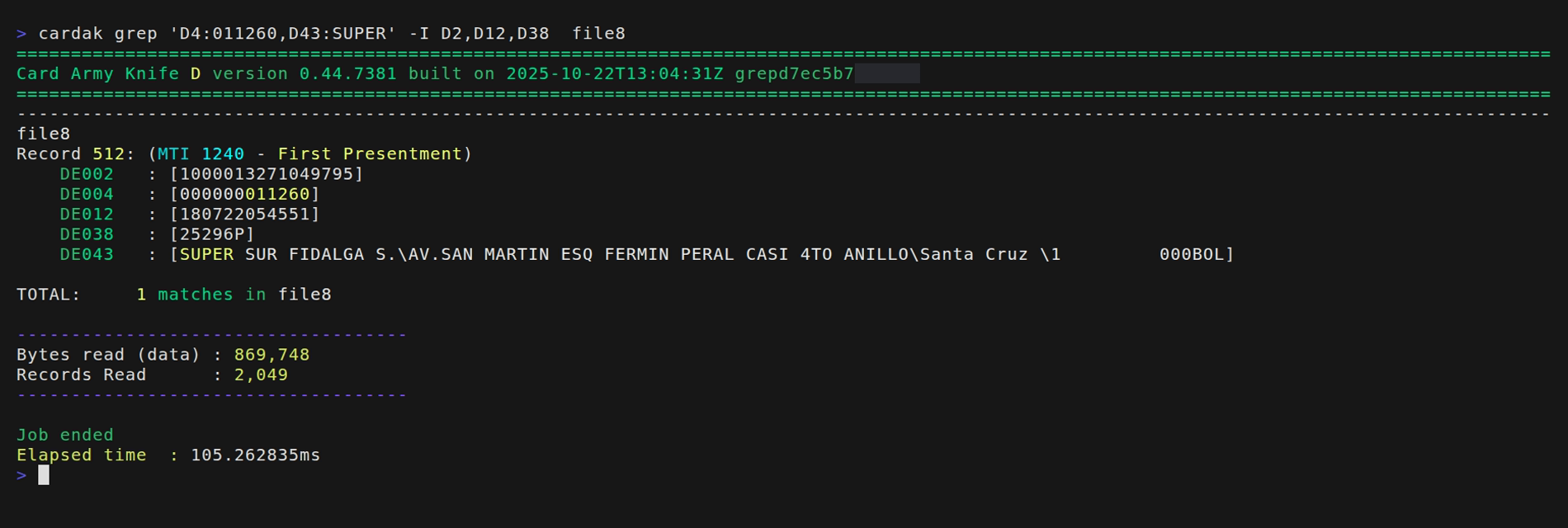
We can see that even when the fields involved for the search criteria were just DE004 and DE043, we are also showing the contents of the fields DE002, DE012 and DE038 belonging to the matching record.
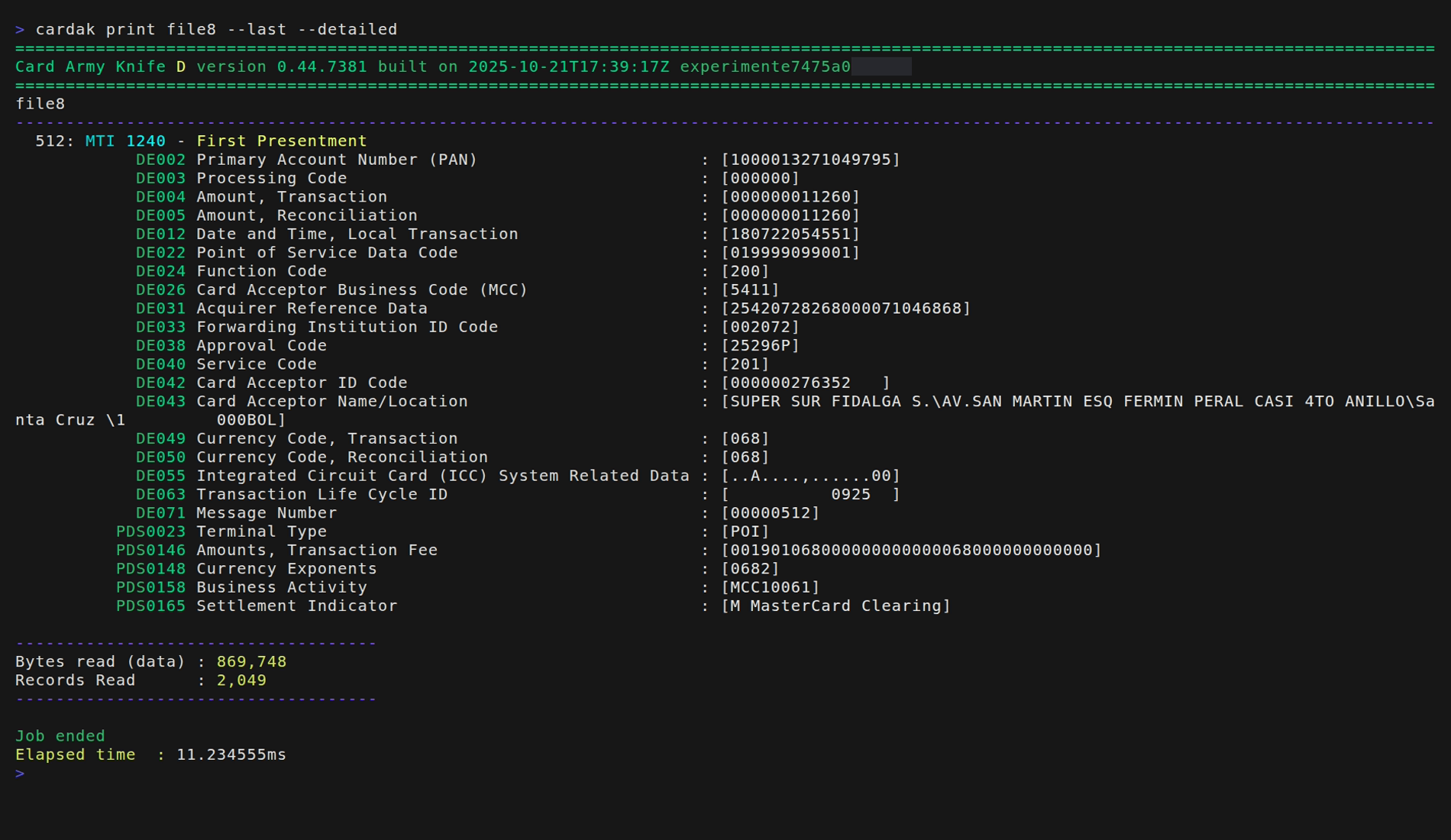
But if we want to display the full record, it is not necessary to add the list of all fields. We can use the PRINT command with the results of the GREP using the flag --last like this: